Showing posts with label mobile. Show all posts

Saturday, February 18, 2017

3 Little Ways to Use Social Media to Market Yourself

One of the most common questions I get asked is how business owners can use social media to market themselves.
There seems to be a lot of overwhelm out there in terms of how to use social media to market yourself. With new tools available all the time, and then older tools acquiring new features (I’m looking at you Instagram!), it’s enough to make anyone’s head spin.
The good news is you can use social media in small ways to market yourself. At the end of the day, it’s a whole lot of little actions that add up over time anyway. Keep that in mind as you implement social media in some small ways.

Show behind the scenes.

Do you want to know what audiences on social media love? Behind the scenes content. I’m serious. They eat it up!
I’m going to go out on a limb here and assume that the reason behind the scenes content is so popular is because we have this craving for public figures and businesses to pull back the curtain and show us their real lives. In a constantly connected world, we’re ironically craving real connection.
One of the ways you can do this is by using the Instagram Stories feature (or Snapchat if you’re still into it). For example, I’ll do small videos where I explain marketing concepts as I’m working on them. It gives some behind the scenes of my business as well as provides value for social media followers.
It doesn’t take a whole lot to do this either. The videos are literally 10 seconds. It’s simply a matter of remembering to do it.

Livestream while you’re working.

A few days ago I was interviewing the founder of a local meetup group for freelancers for my podcast. I posted about it on Instagram and instantly received requests to livestream the interview. Since the people asked for it, we gave it to them.
It ended up being an excellent idea. Not only did I show viewers how I set up for a podcast interview (that’s the behind the scenes stuff I was talking about), we also took live questions from the audience while I was recording.
It was a hit! And all we had to do was fire up Instagram and start a live video of us filming something we were already doing anyway!
So rather than trying to invent new content all the time, you can use social media to show people what you’re already doing.

Share wins.

Another small way you can use social media is to share wins with your audience as they happen.
Did you get featured in the press? Snap a picture of the article and post it on social.
Did you hit a new milestone? Post about it on Facebook.
Did a client text you an amazing testimonial? Ask them for permission to use it, take a screen shot and put it on Instagram.

The Bottom Line

It’s not difficult to use social media to market yourself if you remember that it’s all about small actions that add up over time. By taking it one step at a time and using social media in some of the ways mentioned in this post, you can cut out the overwhelm.

Apple iPhone 7 Plus Camera’s Stunning Low-Light Performance: Photos

iPhone lovers, this article is for you. One thing that has captured everyone’s attention the most on the Apple iPhone 7 Plus is the dual camera. While a lot of other companies too have phones with dual rear cameras, but Apple is doing it differently. Apple’s Shot on iPhone ad campaign is one among them. Apple is touting the vivid colors the phone can captur

Apple is touting the vivid colors the phone can capture. While the iPhone 7 was on a ride globally last year, the results were nothing short of phenomenal. Apple’s Shot on iPhone ad campaign is a kind of a celebration of the iPhone’s camera expertise. It is an open secret that Apple works with professional photographers, around the world, to show off what its new iPhones can do with regard to camera capabilities.

Apple is touting the vivid colors the phone can capture. While the iPhone 7 was on a ride globally last year, the results were nothing short of phenomenal. Apple’s Shot on iPhone ad campaign is a kind of a celebration of the iPhone’s camera expertise. It is an open secret that Apple works with professional photographers, around the world, to show off what its new iPhones can do with regard to camera capabilities.During the campaign in India, Apple believed of focusing on the low light photographic capabilities of the iPhone 7 Plus. After the campaign, the company claims that F/1.8 aperture is a large aperture and allows up to 50% more light onto the camera sensor than iPhone 6s, enhancing the camera’s ability to take low-light photos.

The iPhone 7 Plus has a wide angle lens and a 56mm equivalent telephoto lens at the rear. So when you shoot you have the option to click the 2X button and jump to zoom in a jiffy. Up to 2X is optical zoom and the rest is digital. The zoom works across photo modes like panorama and square. The zoom is, however, limited to 6x when you are shooting video.
You can zoom in on slow-motion too.

3 Useful Android Apps That Aren’t Available On Google Play Store 2017


We all know that apps like Facebook, WhatsApp, Instagram, Snapchat and much more are the top downloaded apps in the Google Play Store, but this doesn’t mean that they are the best apps available. There are a ton of Android apps that are not available in the Google Play store. Apparently, there are more than 1 million Android apps on Google Play store. Some of them are good, others, well not so much.Due to their nature or non-compliance with certain Google policies, there are quite a few others who haven’t made into the official app store, and some are worth investigating. And as a result, most of us don’t even know these apps exist.
These apps are easy to install, so long as you know where to find them. Remember that in most cases you won’t be alerted when they are updated, so it’s a good idea to check back with the download location from time to time to ensure you’re always running the latest version. Also to install these APKs on your Android smartphone/tablet, be sure to enable Install from Unknown Sources from Settings.

Best and Useful Android Apps that are not available on Google Play:

TubeMate is a YouTube downloader app which is not allowed on the Play Store due to Google restrictions.
  • You can download YouTube videos in various formats and resolutions.
  • It also supports downloading video from websites such as Facebook, Vimeo, and DailyMotion, etc.
  • You can also download them as an audio file.
You are advised to download the APK from verified websites, as there are a lot of fakes, infected TubeMate APKs on the Internet.

2. Lucky Patcher:

Lucky Patcher is an app that gives you actual control over the permissions you assign to other apps installed on your android device. First, you have to root your phone before installing the app before you can start modifying app permissions, backing up and restoring apps, deleting excessive advertising and even circumventing license verification for premium apps.
  • Remove ads from apps and games. The app can Identify the apps with an advertisement on your device. It can easily remove the ads.
  • Remove license verification of pro apps. So you don’t need to buy anything from play store. Lucky patcher is able to remove in-app purchase verification.
  • Modify app permission. The app can be used to remove any app permissions.
It’s better to make a full backup of your apps and data before using this app as it can possibly lead to loss of data. It can also remove Google Ads from the app.

3. WiFi Kill:

WifiKill APK is basically a wifi network controller app. It can disable the internet connection of other devices connected to the same wifi network. It is a very useful tool for wifi internet users, using which you can cut other people off from a common wifi network and allocate all the bandwidth to yourself.
  • You can see the list of devices in the wifi network that you are using.
  • WifiKill can show the data transfer rate (download, upload) of grabbed devices.
  • You can monitor the network activity of any device using wifi.
  • Names of the devices connected to the network are displayed.
  • Most importantly, you can cut off the net connection of any device which is connected to the same wifi network as yours.
  • It works on tablets too.
Search for devices on the network by name or IP address. Generate a fake MAC address on your Android.

3 Useful Android Apps That Aren’t Available On Google Play Store 2017 Part -2

We all know that apps like Facebook, WhatsApp, Instagram, Snapchat and much more are the top downloaded apps in the Google Play Store, but this doesn’t mean that they are the best apps available. There are a ton of Android apps that are not available in the Google Play store. Apparently, there are more than 1 million Android apps on Google Play store. Some of them are good, others, well not so much.

Disclaimer:

Some of these apps may harm your device if you don’t use them right or download it from a wrong place. So, install and use them at your own risk.

1. WhatsApp Plus:

You might have heard from everywhere that WhatsApp Plus is not working anymore. But you can use it and do all the functions which were available in original WhatsApp which was made by the developers. WhatsApp Plus comes up with the new and amazing features of hiding last seen and few similar tricks which you will surely love it. You can change the theme of WhatsApp and give it to your friends easily by sharing them as a theme.XML files.
  • Hide last seen, Blue ticks and second ticks.
  • Always Online mode, Option to disable voice calling.
  • You can change launcher icon of WhatsApp.
  • Save, load and share your themes with your friends.
  • Configure pictures pixels and size of the images.
  • You can share high-quality images.
Update: WhatsApp has suspended accounts of some WhatsApp plus user. Using third-party application is against their T&C. So use WhatsApp plus at your own risk. > Option to directly call over the phone.

2. Network Spoofer:

Network Spoofer lets you change websites on other people’s computers from an Android phone. After downloading simply log onto a Wifi network, choose a spoof to use and press start. It is like an advanced version of WiFi Kill. You can redirect traffic of any internet user on the same network. Like  redirecting them to a new web page or replacing words or images in a website. Please note that there is no intention for Network Spoofer to include any malicious features.
  • Flip pictures upside down.
  • Flip text upside down.
  • Make websites experience gravity.
  • Redirect websites to other pages.
  • Delete random words from websites.
  • Replace words on websites with others.
  • Change all pictures to Trollface.
  • Wobble all pictures/graphics around a bit.
  • A few custom modes for you to have your own fun!
Note: This application is a fun demonstration of how vulnerable home networks are too simple attacks, with permission of the network owner – DO NOT attempt to use Network Spoofer on any corporate or other non-residential networks.

3. OG YouTube:

OGYouTube is a unique YouTube client that lets you download any video from YouTube directly. In general, OGYouTube works exactly like the official YouTube client. OG YouTUbe will enable most of the awesome functions which we want on official YouTube.
  • “Audio Only” Downloading: Along with video you can download any video in mp3 format by using Og YouTube, now no need to use any third party mp3 converter to download “audio only” from any YouTube video.
  • Multiple Video Downloading: You can also download multiple videos from YouTube in the same time, no forget that you have to wait for 1st video download finish before putting another video on download. OG YouTube will you feature of downloading multiple videos at same time.
  • Rename The Video: You can rename any video which you are willing to download from YouTube, then there will be the option for renaming the video with any title which you like.
  • Background Playing: One of the best features of Og YouTube, you can play videos in the background too so no need to stay on the app until the video finishes, you can run videos in the background if you want to run any other app at the same time.
But that’s not all, you can also play video when the screen is OFF or even in a pop-up resizable window.

5 Useful Android Apps That Aren’t Available On Google Play Store 2017 Part -3


Disclaimer:

Some of these apps may harm your device if you don’t use them right or download it from a wrong place. So, install and use them at your own risk.

1. VideoMix:

This is the best app that will let you stream videos, TV shows and lots more for free of cost. This app also features a directory of descriptions of video content with links to third-party online resources. There is no app like VideoMix with unlimited movies and TV show episodes to watch for free online.
The app lets you watch as well as download your favorite movies to your device so you can enjoy them later. Also, there will be no need to sign up etc in this app, just open the app search out your favorite media and start streaming.
  • Unlimited movies and TV shows in the huge expansive library, available for free.
  • Videos from the same site provided under one header, to make sorting easy.
  • Attractive interface that is easy to use.
  • Big icons to sort through content easily.
  • IMDb ratings, Bookmarking, download and torrent links available from same simple options bar.
  • Synopsis, genre list and time of broadcast and more information available in just a tap, so you can choose your favorite content to watch easily.
  • Small in size, easy to download from the internet.
Unfortunately, this app is no longer available. But there are other options available.

2. X-posed framework:

Xposed is a framework for modules that can change the behavior of the system and apps without touching any APKs. That’s great because it means that modules can work for different versions and even ROMs without any changes. It’s also easy to undo. As all changes are done in the memory, you just need to deactivate the module and reboot to get your original system back.
The best tool for your rooted Android that has a capability to fully customize your Android looks according to you. All these changes are been done without flashing ROM. Extremely powerful and continuous support from devs.

3. Media River:

Media River Inc. develops contextual search platforms. It offers a ClickSurge platform that enables Web publishers to guide Internet users to the publishers online content in a widget-based delivery model, as well as allows to link the content of various types, including video, music, pictures, and text onto various Web pages based on the properties of that Web pages.
One of the best apps that you will love to have in which you can search and download quickly music, books, Android apps, wallpaper from your Android. So must give a try to this app and have great new experience.

4. AdSkip:

Adskip is a free ad blocker that allows you to block annoying ads and domains known to spread malware. Adskip uses filters that you choose to block all unwanted elements such as video ads, pop-up ads, web ads and many other Internet ads.
And what it does instead of disabling the app (which kills the ads revenue for people like us). It only mutes the video ads. So, the ads play just like that and you just won’t hear anything.

5. MiXplorer:

MiXPlorer (Mix of Explorers) is one of the best Android file managers with a neat user interface and plenty of features that should appeal to both casual and power users alike. MiXplorer is a fast, smooth, beautiful, reliable and fully-featured file manager with a simple and intuitive user interface. However, unlike the File Manager, MiXplorer support 19 cloud storages such as Google Drive, Dropbox, MEGA, and Onedrive for free can also cut/paste multiple separate things instead of one at a time.
This app has no ads, is and will always remain completely free. It is Easily themed with customization option which lets you select any color you like and it had Powerful Text Editor.

3 Best And Funny Prank Call Apps For Android P-2

What if I say you that android has something that you people want to make prank calls. Here are few amazing applications which possess the feature of letting you call your friends from a different number. Just imagine how would it feel when you call up randomly someone from your friend’s numbers and have fun.

As you know that Prank Calls are those whose caller ID is not visible to us. There are many applications available on Google Play store that can do this for you.
Note: This software is only for fun and prank purposes and must not be used for any illegal purposes as you can get tracked easily. With the help of these applications, you will need to fill your details and then hide them while making any prank call to any number.

4. Scare Your Friends – JOKE:

Well, it’s better to be careful with this app as it can bring hell out of anyone. People who fear more might throw your phone away and damage it, so play this prank on someone with good nerves. When your friend is using your phone, a terrifying picture will suddenly appear with a horrifying sound in the background.

For this, you have to choose a horrifying picture and sound to set the time after which you want to scare your friend.

5. Fake GPS Location Spoofer Free:

There are many apps that people use to find your location and where are you going. With this app, there won’t be any chance of finding your location. It means you can easily fake your location with this app. Fake GPS Location Spoofer allows you to choose any place in the world and make your friends quite confused about it.

It will overwrite your current proximity elegantly so that you can prank your friends on any social network to think you are somewhere else. Make sure you disable high accuracy location positioning/mobile locations under AndrChoose your faked location and press play. The app will insert the fake location into your android phone. Allow mock locations under Developer settings.oid Location Settings and leave “GPS ONLY” or called “Device only” on some devices.

Note: This app is provided “as is” and we cannot be held responsible for any usage by the end users of our app. This app is free with limited functionality and is for testing purposes only.


6. Voice changer with effects:


Pranksters will think of something to fool people. Others will just have a good time with this app. This app offers more than 30 different effects which you can use to make your voice sound funny and make you laugh very hard. In this app, you can share your recordings with friends, save them to your phone.
n this app, you have a chance of sharing the picture or video on WhatsApp, E-mail, Dropbox, etc. You can also create an image with sound and create a voice from text.

3 Best And Funny Prank Call Apps For Android

Every one of us likes to spend time with our friends, besties and family members. We would even call up on phone from a different number to someone among our friends and make fun of him talking like some other person (stranger). It would be so much fun to play pranks (especially prank calls) with your friends.What if I say you that android has something that you people want to make prank calls. Here are few amazing applications which possess the feature of letting you call your friends from a different number. Just imagine how would it feel when you call up randomly someone from your friend’s numbers and have fun.
As you know that Prank Calls are those whose caller ID is not visible to us. There are many applications available on Google Play store that can do this for you.
Note: This software is only for fun and prank purposes and must not be used for any illegal purposes as you can get tracked easily. With the help of these applications, you will need to fill your details and then hide them while making any prank call to any number.

1. Fake-A-Call Free:

By using this app, you can easily fool your friends and have fun. No one expects to receive fake calls and that is why this kind of apps are best for playing pranks. This app allows making fake calls both to your friends and to yourself. It provides you with different voices in order to escape recognition.Fake-A-Call Free App comes in two versions. The paid one includes extra scripts and voices and shows no ads. So the free one is quite enough. Download it and make your first fake call. You’re surely gonna love it!This app can Auto-fill from your contacts, you can select your own ringtones, record voice on other end and schedule fake calls.

2. Fake Call 2:

This app allows you to make a fake incoming call from a virtual girlfriend to avoid awkward situations. This app is the most professional and beautiful fake caller ID application. It can simulate a fake caller id to rescue yourself from an awkward situation. In this app, you can put any Caller Picture, Caller Name and Caller Number.

3. Call Voice Changer – IntCall:

t simply cannot be excluded from this list, because it is one of the hilarious apps, that can make laugh anyone. This app is a mixture of making a fake call to someone and changing your voice into something hilarious. It doesn’t actually fake calls like those apps above, but you can use a different phone number to call from.

WHAT TRAVEL EXPENSES CAN FREELANCERS WRITE OFF?

No one understands the need to save like freelancers. Saving money on your business expenses is the best way to improve your bottom line. If you are a freelancer and find yourself traveling for any reason, you may be able to write off some of the costs. Depending on what you are doing while away from home, you may be able to write off plane tickets, hotel rooms, meals, coffee, and more. Continue on to learn what you can write off when traveling as a freelancer.

The Purpose of Your Trip

To decide what you can write off, you first have to look at the primary purpose of the trip. If you are traveling for a conference or primarily for a work-related purpose, you can write off the biggest travel related expenses without worry.
If the primary purpose of your trip is work, you can write off your plane ticket, hotel, rental car, and other major expenses. Having your business pay for the expense means your net income is lower, and therefore your taxes are lower. For most small business owners, your tax bill will go down by 25% or 28% of the cost you wrote off.

Any Business Meetings Along the Way?

Even if your trip is not primarily for business, you may be able to write off some parts of your travels. For example, I recently took a trip to Austin to visit family and friends. One of the friends I saw is a member of my mastermind group and we talked business while hanging out.
During our time together, we went for dinner. Because we discussed business strategy during dinner, I was able to write off the cost of that meal. Because you have to eat anyway, you can’t deduct 100% of the cost of the meal according to IRS rules. Only 50% is deductible. But I’ll take 50% over 0% any day!

Are You Working While Traveling?

If you are traveling for pleasure but working along the way, you may still have some write offs in your future. If you pay for a day pass to a co-working space, you can write it off. If you pay for a cup of coffee to have a place to work, you can write it off. After all, that cup of coffee also came with a table to work on and an internet connection. But if you are just watching cat videos on your laptop, Uncle Sam won’t let that write off slide. If you took the coffee to go, the tax man won’t let you off the hook.
Remember, the overall rule is the primary purpose of what you’re doing. If your family comes along, their expenses are generally not deductible. If you are playing and having fun: not deductible. If it is all about business, then you can write it off.

If it is Related to Business, You Can Write it Off!

Whether you are at home or on the road, taking advantage of business write offs is an important part of your business financial management. Get educated about how business write offs work to ensure you keep as many dollars as possible.
Business taxes can be confusing, so if you are in doubt, it is best to work with a tax professional. If you write off too much, you could find yourself on the wrong side of an IRS audit. But if you do everything on the up and up, you should not have anything to worry about aside from how much money you can save on your taxes.

Saturday, February 11, 2017

How to Turn On “Secret Conversations” On Facebook Messenger

Just like Whatsapp, Facebook’s new feature of messenger called a “Secret conversation” provide the end to end encryption which means that the messages are intended just for you and the other person—not anyone, including Facebook. In the secret conversation both the sender and receiver have a device key that you can use to verify that the messages are end-to-end encrypted. However, unlike Whatsapp, the end-to-end encryption setting will not be default and users can choose to turn it on.


How to Start a Secret Conversation on Facebook Messenger?

The Secret Conversations are currently available in the Messenger app on iOS and Android, so they won’t appear on Facebook chat or messenger.com. To Turn on the secret conversation follow the given steps.


  1. Firstly, the user will have to tap on friend’s name, and just above the Audio call and Video call options, you can see the ‘Secret Conversation’ option (if the update has rolled out to you).
facebook-messenger
2.  Tap Secret Conversations.
secret-converations
3. Switch to ON Position.
4. Once click on the secret conversation you will see “This will be the only device you can use to send and receive encrypted messages.”
fb-secret-converations
5. Tap Turn On to enable Secret Conversations.
6. You can now start an end-to-end encrypted chatting session.
turnon-secert-converation
7. You can also select see a clock in the bottom right-hand corner of the screen.
fb-messenger-secret-conversation
8. Set a timer to have your messages disappear from the conversation.
timer-for-secert-conversations
9. If yo want to abort the action click on cancel button.
turnoff-secert-conversations
Note: You might not be able to start a Secret Conversation with everyone, even if you have the update because the other person might still not have the feature.
The Secret conversations can be read on only one device. So if you start a secret chat on Facebook Messenger on your smartphone, then don’t expect to see them on your desktop as wellFacebook Messenger’s Secret conversations only visible on the device where you create the conversation and the device the recipient uses to open the conversation.

Friday, February 10, 2017

These Secret Codes Let You Access Hidden iPhone Features


 iPhone is the most popular type of cell phone in the world which has much craze among the people due to its stunning look, incredible features, and design. Despite the fact that millions own an iPhone, many are unaware of some of the most amazing features hidden away in this little device. Did you know that there are actually a handful of secret iPhone codes? Yes, it’s true.

Check The List of iPhone Secret Codes:

1. Block Caller ID:

By using the simple code you can hide your phone number. No one would be able to identify if it’s you calling. To do this just dial #31# and your phone number.
Block Caller ID

2. Check Signal Strength:

The signal bars are not the correct method to measure whether the signal is good or bad. Dialing *3001#12345#* will bring up a list of options. Ignoring the list of choices, just hold down the power button until the home screen reappears.

                                                            Check Signal Strength


3. Find Your Phone’s Unique IMEI:

We know that every phone as its unique code identifier that is displayed inside the phone settings.

 iphones-iemi

 Now, you are aware of the iPhone secret codes right. Will these codes make your life easier? Do let us know in the comment section below.


Fix Slow PC And Know Why PC Gets Slower


Your PC Gets Slower For Fragmented Hard Drive:

Now the first reason is after using your computer your hard drive gets fragmented and filled up. And all the files are spread all over the hard drive. And for this reason, your computer gets slower.

You Can Fix Slow PC By Defragmenting Your Hard Drive:

How can you fix this is defragmenting your hard drive? Despite all the files that are used more commonly together. So it doesn’t take as long for the hard drive to search for these files. Now if you’re on Windows 10 this is done automatically. Now if you’re on Seven, XP or earlier Vista than you have to either run the program that comes with Windows. Or download one manually.

Your PC Can Slow Down For A Lot Of Programs:

The next reason is that as you use your computer and install new programs. You probably get a lot of programs. That start up when you don’t really want them to. Now you can download programs for example once called CCleaner. And this will actually help you go
through and Remove Programs from start up and stop them from starting up on boot. And this will significantly decrease your big time. You should also uninstall programs that you don’t use anymore. Because this will also free up hard drive space.

Viruses Or Malware Can Slow Down Your Computer:

Now the last reason also is most common. Is that you may have viruses or malware on your computer. And to remove these which are probably using up system resources and making it slow. Is that you have to download a virus scanner or at least to run it even if you have it. Or maybe a malware scanner and two with these are Microsoft Security Essentials which is free. And it’s actually made by Microsoft. If you are in windows 10 then Microsoft Security Essentials is built into it. Or if you are in Windows 7 or Windows Vista now you candownload it. And another free one is Malwarebytes. These are both very good both free.
Now if you really want to get your computer back in running to the way it was on day one. Then you’re gonna need to reformat your hard drive and reinstall your operating system. I would not recommend doing this if you’re not very good with computers are very experience. Because this will wipe out your hard drive, and basically reinstall completely fresh. So you definitely don’t want to do this without backing up first. So you can get your files stored away safely before you do it. And also you should probably have someone else do this. If you’re not sure what you’re doing so then you won’t mess anything up.
So, those are all the reasons why your computer might be getting slow and how you can fix it. I hope you enjoyed this article. So be sure to share this article and leave a comment about whether your computer was able to speed up a little bit by doing the steps and thanks for reading.

INSTAGRAM’S SNAPCHAT-LIKE FEATURE ALLOWS 24-HOUR-LIMIT POSTS!


Users of Instagram, a photo-sharing app owned by Facebook Inc , can now post picture and video slideshows that last 24 hours, a feature similar to the signature function of social media rival Snapchat.
Snapchat, which launched in 2011, got its initial boost from millennials, especially teenagers, who value the privacy that the app offers. Text messages disappear right after they are read, and posts expire after 24 hours.
As with Snapchat, the new Instagram Stories feature allows its 500 million members to annotate their posts with emojis, doodles and texts, Instagram said in a blog post on Tuesday.
The feature is the latest salvo between Facebook, which bought Instagram for $1 billion in 2012, and Snapchat, which rejected Facebook’s $3 billion buyout offer just three years ago, as they try to attract more users.
Snapchat is popular with younger people who want to shield their posts from the eyes of their parents, who are more likely to be on Facebook, whose 1.7 billion monthly users tend to be older. Snapchat recently surpassed Twitter Inc in daily users and is valued at around $18 billion.
In July, Snapchat introduced a Memories feature that enables users to save and share their content, as on Facebook.
Instagram Stories allows followers to send direct messages to the uploader but users cannot “like” an image or post a comment, as in Facebook.
Instagram Stories is available in the United States and will roll out globally over the next few weeks on Apple Inc iPhones and Alphabet Inc’s Android-based smartphones, Instagram said.
“This is the latest step in putting video at the center of all our services. People are already creating and sharing more video, so we’re going to make it even easier,” Facebook Chief Executive Mark Zuckerberg wrote on his Facebook account.
Many replies to Zuckerberg’s post pointed out the new feature’s resemblance to Snapchat.
Facebook user Antoine Maillot wrote: “Snapchat-like on Facebook World… No, I prefer the real Snapchat app, sorry.”
Shares of Facebook fell 1.1 percent to $122.92 at mid-afternoon.

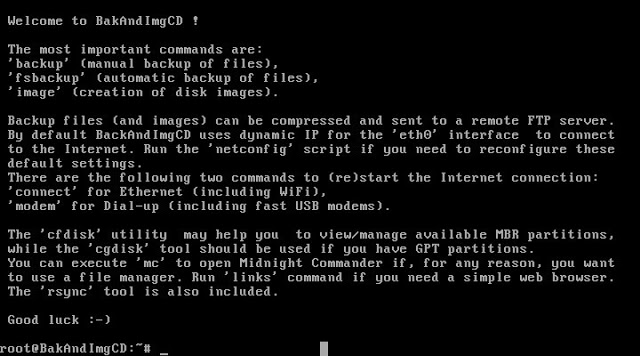
DATA BACKUP AND DISK IMAGING LIVE CD OFFICIALLY RELEASED


The Live CD is now based on 4MLinux Backup Scripts 19.0
4MLinux developer Zbigniew Konojacki informs Softpedia today, August 9, 2016, about the immediate availability of download of the BakAndImgCD 19.0 data backup and disk imaging Live CD.
Based on 4MLinux Backup Scripts 19.0, and implicitly on the 4MLinux 19.0 operating system, BakAndImgCD 19.0 is here in its final and production-ready state to help you backup your data from any possible Linux, Microsoft Windows, or Mac OS X file system, including Btrfs, EXT2, EXT3, EXT4, FAT16, FAT32, NTFS, HFS, and HFS+.
Additionally, BakAndImgCD 19.0 supports the less popular F2FS, NILFS2, JFS, Reiser4, ReiserFS and XFS filesystems, and it also includes the widely-used and open-source GNU ddrescue, Partimage and Partclone utilities to allows users to perform disk imaging (also known as cloning) operations on any partition or drive (HDD or SSD).
The best part of the BakAndImgCD 19.0 Live CD is that it works independently of a computer operating system. It is designed to run in live mode directly from the bootable medium where it is deployed, be it either a USB flash drive or a CD/DVD disc. The latest version, BakAndImgCD 19.0, is now available for download via our website.
In the meantime, Zbigniew Konojacki works hard to release the final 4MLinux 19.0 operating system, which promises to bring all the latest software applications that have been announced lately, as well as the most recent and popular GNU/Linux technologies. More details should be available on the date of September 1, 2016.
Source: softpedia.com

5 Cool Things You Didn’t Know Your Android Phone Could Do

Smartphones are basically a computer in your pocket with a lot of features to make your life easier. It turns out that there are so many cool things you can do with Android phone that you probably don’t even know. From Priority Mode feature to custom icon packs, PushBullet, smart lock system, there is plenty to keep you happy for a while. And as necessity is the mother of all inventions, everything is possible but only if you can pursue it. So to help you get the most out of your phone, here are 15 cool things or tricks that you can do with your Android phone.


1.Voice search

Your Android wants to help you out; it’s just waiting on the word. Google will help to send an email or text, or even figure out what song is playing on your mobile just by listening to you.
Click on the microphone icon in Google search (or say “OK Google”) and send an email or text (just say, “Text Siri, Where are you?” or “Email John, When are you coming?” and hit send), or email yourself a reminder (“Note to self, call John”). You can even find out about the weather or traffic (“Do I need an umbrella today?” or “How is the traffic now at East Zone”), track your flights or packages (if you’ve gotten confirmation emails), figure out what song is playing on your mobile (”what’s that song?”) or simply ask any research question you’d otherwise type into the search bar. Google listen will find it out.

2.Swipes to make your phone work quicker

We use one finger to swipe for notifications. Use two fingers to swipe down for quick settings.

3.Allow calls from selected people you want


 The Priority Mode feature will give you the options to be interrupted by the people you want.


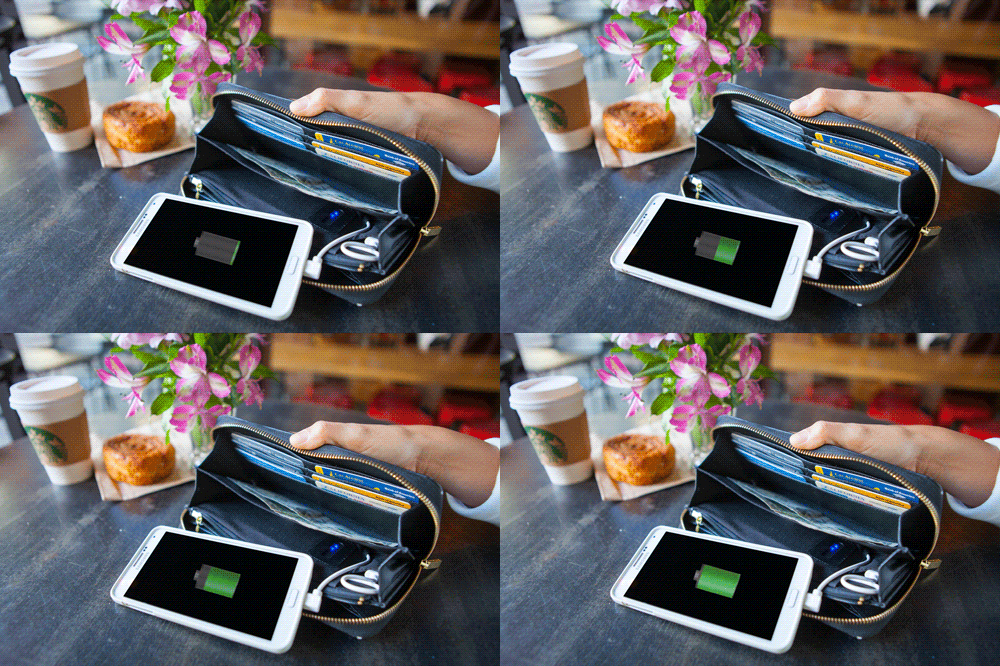
4.Use Wallet to extend the battery life


 This is a power wallet which has a lightweight backup battery for android phones.

5.Use ‘Smart Lock’ to unlock the phone automatically when you are at home


 Thanks for reading.